How Hands Free Home Controls Work
How Hands Free Home Controls Work
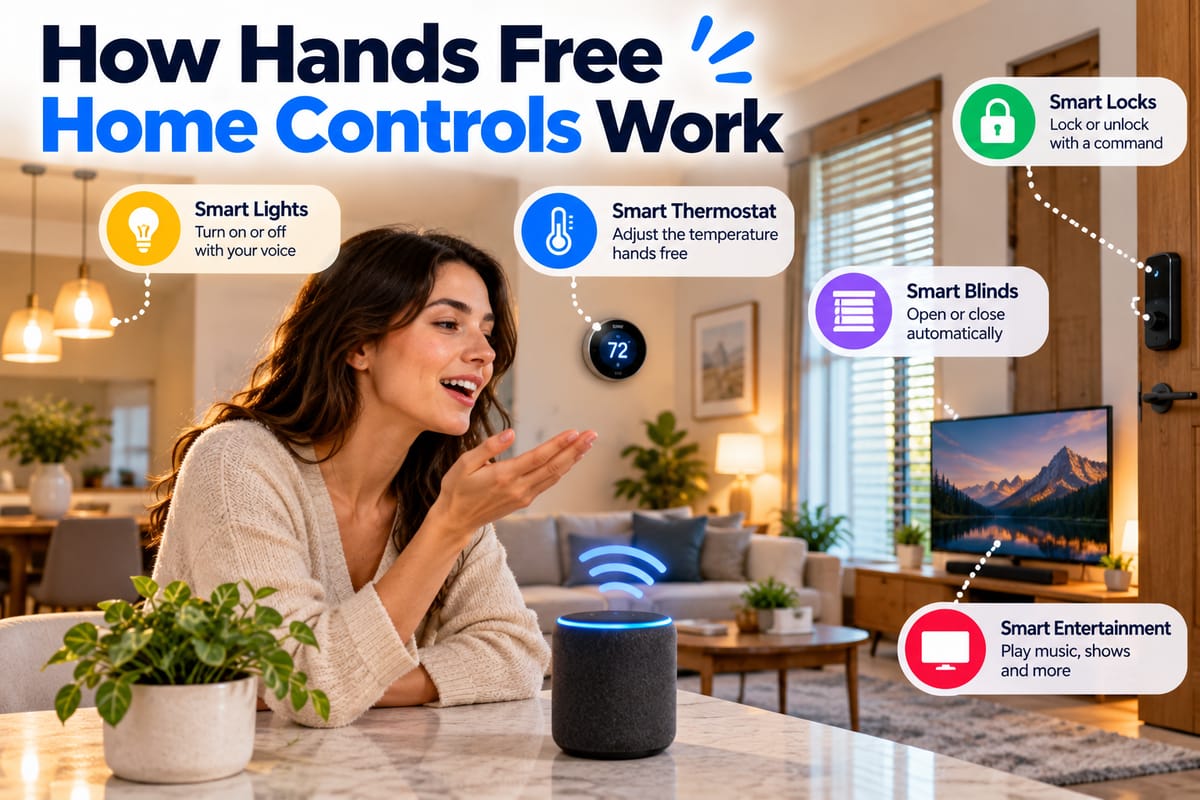
Smart home technology has made it possible to control many household devices without physically touching a switch, button, or remote. A simple voice command, gesture, or automated trigger can turn on lights, adjust a thermostat, lock a door, play music, or activate another connected device.
Hands-free control is one of the features that can make a connected home feel genuinely convenient. Instead of searching for a phone or walking across a room to operate a device, homeowners can interact with their surroundings through voice assistants, sensors, gestures, and other technologies.
But hands-free control involves more than simply speaking to a smart speaker. Several components must work together to recognize the command, understand what the user wants, identify the appropriate device, and send an instruction that the device can execute.
What Are Hands-Free Home Controls?
Hands-free home controls are technologies that allow people to operate connected household devices without physically interacting with the device itself.
Depending on the system, control may happen through:
- Voice commands
- Presence detection
- Motion sensors
- Gestures
- Automated routines
- Environmental sensors
- Scheduled events
- Context-aware triggers
Voice control is one of the most recognizable examples. A homeowner might say a command to turn off the lights without touching a wall switch.
Other hands-free systems can operate automatically. A motion sensor could trigger a hallway light, while a presence sensor could adjust the home’s temperature when someone enters a room.
These technologies are part of the broader connected-home ecosystem described in The Complete Guide to Smart Homes.
How Voice-Controlled Smart Homes Work
Voice control typically involves several stages.
A simplified process looks like this:
Voice command → Wake-word detection → Speech recognition → Intent interpretation → Device identification → Command transmission → Device action
Each stage performs a different job.
1. The System Detects a Wake Word
Many voice assistants use a wake word or activation phrase to determine when a person is trying to interact with the system.
A smart speaker may continuously listen locally for a particular activation pattern without necessarily sending every sound it hears to a remote service.
Once the activation phrase is detected, the system begins processing the following speech as a potential command.
2. The Assistant Processes the Speech
The system converts spoken language into information that software can interpret.
For example, a user might say:
“Turn the living room lights off.”
The assistant needs to identify several elements of that sentence:
- Action: Turn off
- Device: Lights
- Location: Living room
Speech recognition and language-processing systems help transform the spoken request into a structured command.
3. The Assistant Determines the User’s Intent
The assistant then interprets what the user actually wants to happen.
Natural language is flexible. A homeowner might say:
- “Turn off the lights.”
- “Switch the lights off.”
- “It’s too bright in here.”
- “Kill the living room lights.”
Depending on the system, different phrases may be interpreted as the same underlying intent.
The assistant must therefore connect human language with the capabilities and names of connected devices.
4. The Correct Device Is Identified
A connected home can contain dozens of devices, sometimes from multiple manufacturers.
The assistant needs to determine which device or group of devices should respond.
Names, rooms, groups, device types, and user preferences can all help with this process.
For example, if a home contains lights in the kitchen, bedroom, hallway, and living room, the assistant needs a way to distinguish among them.
5. The Command Is Sent
After interpreting the request, the smart home system sends an instruction to the appropriate device or controller.
The communication method can vary depending on the architecture.
Devices may communicate through:
- Wi-Fi
- Bluetooth
- Thread
- Zigbee
- Z-Wave
- Ethernet
- A proprietary wireless protocol
The specific technology determines how commands travel through the home.
6. The Device Performs the Action
Finally, the target device receives the command and performs the requested action.
A smart bulb changes state. A thermostat adjusts its target temperature. A smart lock activates its locking mechanism.
The entire process may take only a few seconds or less, creating the impression that the device responds directly to the spoken instruction.
The Role of Smart Speakers and Voice Assistants
Smart speakers often serve as an interface between people and connected devices.
They combine microphones, processing hardware, software, network connectivity, and voice-assistant services.
However, the speaker itself may not directly control every device.
Instead, it can act as the front end of a larger system. The assistant interprets the command and communicates with the appropriate smart home platform, hub, or device service.
The different components involved are explained in How Smart Speakers and Voice Assistants Control Connected Home Devices.
How Hands-Free Controls Work Without Voice
Hands-free control does not always involve speaking.
Smart homes can use sensors and automation systems to detect conditions and respond automatically.
Motion Detection
Motion sensors can identify movement within a particular area.
A common example is a hallway light that turns on when someone walks into the space.
The user does not need to say anything or touch a switch.
Presence Detection
Presence detection attempts to determine whether someone is actually in an area rather than simply detecting movement.
This can be useful for applications such as:
- Lighting
- Heating and cooling
- Security
- Entertainment
- Energy management
Presence detection can sometimes use multiple signals to determine whether a person is nearby.
Gesture Control
Some systems use cameras, sensors, or specialized hardware to recognize gestures.
A person might perform a particular movement to control lighting or another connected function.
Gesture control is less common than voice control in many residential systems, but it demonstrates that hands-free interaction can take several forms.
How Smart Home Routines Create Hands-Free Control
Automation routines allow several actions to happen based on a trigger.
For example, a homeowner could create a routine that:
- Detects that someone has arrived home.
- Turns on selected lights.
- Adjusts the thermostat.
- Unlocks an approved smart lock.
- Turns on another connected device.
The user does not have to issue each command individually.
Other triggers can include:
- Time of day
- Motion
- Presence
- Temperature
- Door activity
- Security events
- Device states
- Calendar events
- Environmental conditions
This transforms a smart home from a collection of individually controlled devices into a coordinated system.
Why Device Compatibility Matters
Hands-free control works best when connected devices can communicate effectively with the platform responsible for managing them.
A homeowner may have a voice assistant from one company, lights from another, a thermostat from a third manufacturer, and smart locks from another brand.
If these products do not support compatible communication standards or integrations, a voice command may not be able to control all of them.
This is why How to Make Different Smart Home Devices Work Together is an important part of understanding hands-free home automation.
Compatibility can depend on:
- Supported platforms
- Communication protocols
- Device certifications
- Manufacturer integrations
- Smart home hubs
- Software versions
- Account configuration
How Rooms and Device Names Affect Voice Control
Device naming may seem like a small detail, but it can significantly affect hands-free control.
Imagine a home containing several lights named:
- Light 1
- Light 2
- Light 3
- Light 4
A voice assistant may have difficulty determining which device the user means.
A clearer organization might use names such as:
- Kitchen lights
- Bedroom lights
- Hallway lights
- Living room lights
Room assignments can make the system even easier to use.
For example, saying “turn off the lights in the bedroom” provides both an action and a location.
How Groups Make Hands-Free Control Easier
Smart home platforms can often group multiple devices into a single logical unit.
A “living room lights” group might contain several individual bulbs.
Instead of addressing each bulb separately, the user can issue one command that applies to the entire group.
Groups can also be used for routines.
For example, a “movie night” routine could adjust lighting and other compatible devices simultaneously.
This reduces the number of individual commands required to operate a connected home.
How Multiple People Can Use Hands-Free Controls
A household rarely consists of one person.
Families, couples, roommates, guests, and other household members may all want to use the same smart home.
This introduces additional challenges.
The system may need to distinguish between:
- Different voices
- Different accounts
- Different permissions
- Personal preferences
- Shared devices
- Private information
The practical considerations involved are explored in How Multiple People Can Use Voice Assistants to Control One Smart Home.
A well-configured system can allow multiple residents to interact with shared devices without requiring everyone to use exactly the same account or settings.
Voice Profiles and Personalization
Some voice-assistant systems can recognize individual users.
Voice profiles may allow the system to associate certain requests with particular accounts.
This can be useful for personalized functions such as:
- Calendars
- Music preferences
- Shopping lists
- Reminders
- Personal information
However, voice recognition should not automatically be treated as a perfect security mechanism.
A person’s voice can potentially be heard by others, recorded, imitated, or misrecognized. Sensitive functions may therefore require additional authentication.
Hands-Free Control and Smart Locks
Smart locks demonstrate why convenience and security need to be considered together.
A voice command that turns on a light is relatively low risk. A command that unlocks a front door has much greater consequences.
For that reason, smart home platforms may impose additional restrictions around sensitive actions.
Depending on the system, unlocking a door through a voice assistant might require:
- A PIN
- Smartphone confirmation
- Biometric authentication
- Physical presence
- Additional account verification
Security requirements vary by manufacturer and product.
Hands-Free Controls and Privacy
Voice assistants and smart sensors can raise legitimate privacy considerations.
Microphones, cameras, presence sensors, and connected accounts can potentially collect information about activity within the home.
Important considerations include:
- What information is collected?
- Where is it processed?
- How long is it stored?
- Who can access it?
- Can recordings be deleted?
- Which devices have microphones or cameras?
- What permissions have been granted?
Convenience should therefore be considered alongside privacy when selecting and configuring hands-free technologies.
What Happens When the Internet Goes Down?
Not every hands-free function depends on the internet in exactly the same way.
Some systems require cloud services to interpret voice commands or communicate with manufacturers’ servers. Others can perform certain automations locally.
The result is that a home may retain some functionality during an internet outage while losing other capabilities.
For example:
- A locally controlled light may continue responding to a compatible sensor.
- A cloud-dependent voice assistant may stop processing commands.
- A locally managed automation may continue operating.
- A remote-control smartphone feature may become unavailable.
The exact behavior depends on the system architecture.
Local Processing vs. Cloud Processing
Smart home systems can process information locally, remotely in the cloud, or through a combination of both.
Local Processing
With local processing, information can be handled within the home or on the device itself.
Potential advantages include:
- Faster responses
- Reduced dependence on internet connectivity
- Greater control over certain data
- Continued operation during some outages
Cloud Processing
Cloud services can provide greater computing resources and centralized software capabilities.
They can also make remote access and large-scale service management easier.
However, cloud-dependent functionality generally requires a working internet connection and depends on the availability of the relevant service.
Many modern smart homes use a combination of local and cloud processing.
Why Hands-Free Controls Sometimes Fail
A voice command can fail for many reasons.
Possible causes include:
- Poor microphone pickup
- Background noise
- Unclear device names
- Network problems
- Unsupported commands
- Device compatibility issues
- Account configuration problems
- Manufacturer service outages
- Software bugs
- Incorrect room assignments
A failure does not necessarily mean the smart device itself is broken.
Troubleshooting should start by determining where in the command chain the problem occurred.
Making Hands-Free Controls More Reliable
Several practical steps can improve the experience.
Use Clear Device Names
Choose short, distinctive names that are easy to pronounce.
Organize Devices by Room
Assigning devices to the correct rooms can make voice commands more natural.
Keep Software Updated
Firmware and companion applications can receive compatibility improvements and bug fixes.
Maintain a Reliable Network
Smart home devices depend heavily on network connectivity. A poorly positioned router or weak wireless signal can affect responsiveness.
Reduce Unnecessary Complexity
Adding too many overlapping platforms, hubs, and integrations can make troubleshooting harder.
A simpler architecture is often easier to maintain.
Test Automations
After creating a routine, test it under normal conditions.
An automation that looks correct on paper may behave differently when several devices respond simultaneously.
Hands-Free Controls Can Improve Accessibility
Voice and automated controls can be particularly useful for people who have difficulty reaching physical switches or interacting with small buttons.
A person may be able to control lighting, temperature, entertainment, and other household functions through speech or automation.
Hands-free systems can also reduce the need to physically move around the home for routine tasks.
Accessibility should therefore be considered alongside convenience when evaluating smart home technology.
Hands-Free Home Controls Are Becoming More Context-Aware
Modern smart homes are moving beyond simple commands such as “turn on the lights.”
Systems can increasingly combine information from multiple devices and sensors to understand context.
For example, a system might use:
- Time
- Location
- Presence
- Temperature
- Lighting conditions
- Device states
- User preferences
Instead of requiring a separate command for every action, the system can respond to a combination of conditions.
The challenge is ensuring that greater automation remains predictable and understandable to the people living in the home.
Balancing Convenience With Control
The greatest benefit of hands-free home technology is convenience, but automation should not remove the homeowner’s ability to understand or override what is happening.
A well-designed system should make it reasonably clear:
- Which devices are connected
- Which automations are active
- Which people have access
- Which actions require authentication
- What happens when connectivity is lost
- How devices can be manually controlled
Physical switches and manual controls can remain useful even in highly automated homes.
Building a Practical Hands-Free Smart Home
Hands-free control does not require turning every household device into an automated product.
A practical approach is to start with functions that provide clear value.
Popular starting points include:
- Lighting
- Thermostats
- Smart speakers
- Entertainment systems
- Plugs
- Blinds
- Security notifications
Once those systems work reliably, homeowners can decide whether additional automation is worthwhile.
The most effective setup is usually not the one with the greatest number of connected devices. It is the one that makes everyday tasks easier while remaining reliable, understandable, and secure.
The Future of Hands-Free Home Interaction
Hands-free control is changing the way people interact with household technology.
Voice assistants provide a conversational interface, while sensors and automation systems allow devices to respond to conditions without requiring direct commands. Compatibility standards and improved integrations can make it easier for products from different manufacturers to participate in the same ecosystem.
At the same time, privacy, security, reliability, and user control remain important considerations.
The underlying idea is simple: instead of requiring people to operate every device manually, the home can respond to instructions, context, and routines.
When the different components are configured carefully, hands-free control can turn a collection of connected products into a more coordinated living environment—one where everyday tasks require less physical interaction without sacrificing control over how the home operates.