What Happens to Smart Security During Internet Outages
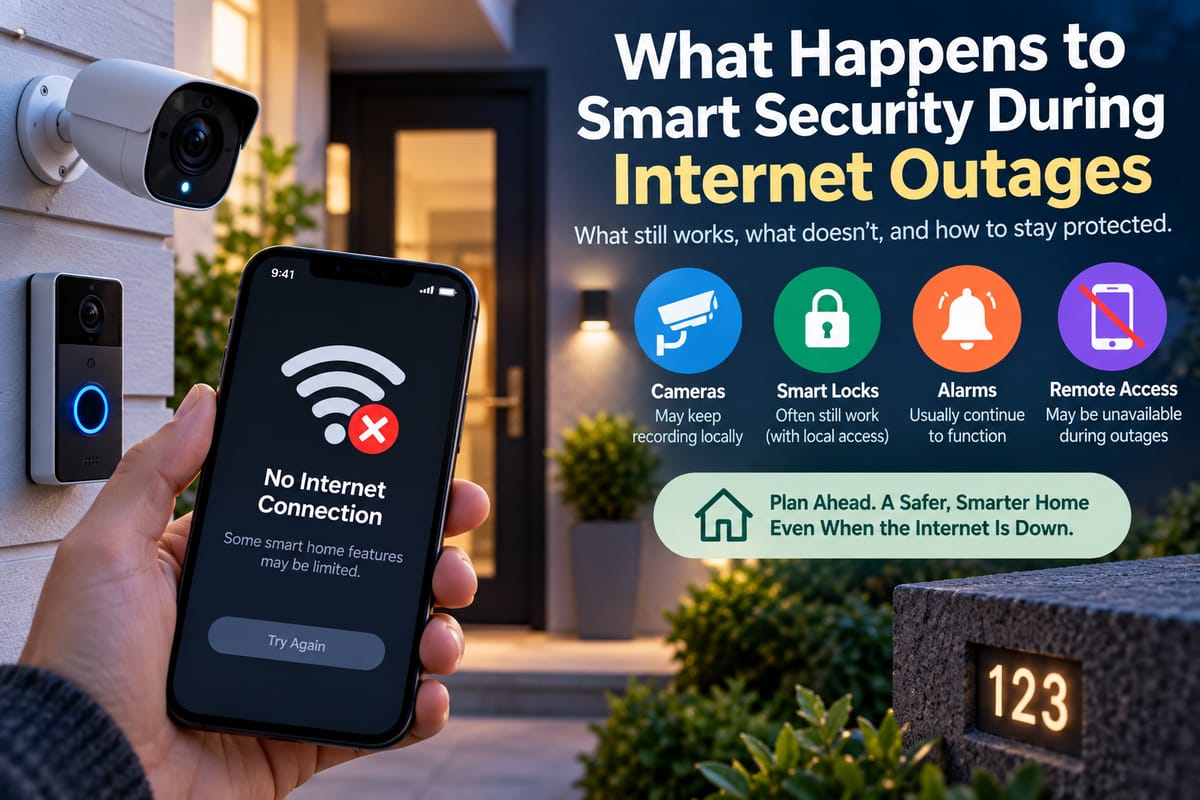
What Happens to Smart Security During Internet Outages
Smart security systems have changed the way homeowners monitor and protect their properties. Doorbell cameras can send alerts to smartphones, security cameras can record activity, smart locks can provide keyless entry, and motion sensors can trigger connected lights or alarms.
But these features often depend on several layers of technology working together.
When the internet goes down, a smart security system may continue protecting the home, lose some features, or become significantly less useful depending on how it was designed. The difference often comes down to local network connectivity, cloud services, backup power, local storage, and whether the system has a dedicated hub.
Understanding what happens during an outage can help homeowners choose better equipment and prepare for situations when internet service is temporarily unavailable.
Internet Access Is Only One Part of Smart Security
A common assumption is that every smart security device stops working as soon as the internet connection disappears.
That is not always true.
A typical smart security system may involve several layers:
Security device → Home network → Router → Internet connection → Cloud service → Smartphone
A problem at any point can affect certain functions.
For example, a camera may still be powered on and connected to the local Wi-Fi network even when the internet is unavailable. It might continue recording locally while losing the ability to send notifications to a smartphone outside the home.
This distinction is important because internet connectivity and local networking are not the same thing.
What Happens to Security Cameras?
Security cameras are among the smart devices most visibly affected by internet outages.
Cloud-dependent cameras may lose access to features such as:
- Remote live viewing
- Smartphone notifications
- Cloud video storage
- Remote configuration
- Cloud-based video analysis
- Remote playback
However, some cameras can continue operating locally.
A camera with a microSD card, network video recorder, or local storage system may continue recording even when the internet connection is unavailable.
This means the camera can still capture activity inside or around the property even though the homeowner cannot view the footage remotely.
The exact behavior depends on the camera and its storage architecture.
Local Recording Can Make a Big Difference
Local video storage can provide an important layer of resilience.
Instead of sending every recording to an external cloud service, a camera can save footage to storage located within the home.
Possible options include:
- microSD cards
- Network video recorders
- Local storage hubs
- Home servers
- Security systems with built-in storage
With local recording, an internet outage may prevent remote access while allowing recording to continue.
This can be especially useful when homeowners care more about having a record of events than receiving immediate remote notifications.
However, local storage has its own risks. If an intruder steals or damages the recording device, locally stored footage may be lost.
Some systems therefore combine local storage with cloud backups when internet service is available.
What Happens to Smart Doorbells?
Smart doorbells can also lose some features during an internet outage.
A doorbell may still detect someone pressing the physical button, but it might not be able to send the event to a smartphone if that notification depends on cloud connectivity.
Potentially affected features include:
- Remote notifications
- Live video
- Cloud recording
- Two-way communication
- Remote settings
- Smartphone access
Some systems can still perform limited local functions.
For example, a connected chime inside the home may continue to work if the doorbell and chime communicate locally.
The result depends on the design of the system.
What Happens to Smart Locks?
Smart locks can be particularly important during an outage because access to the home should not depend entirely on an internet connection.
Many smart locks provide multiple ways to enter, including:
- Physical keys
- Keypads
- Bluetooth
- Fingerprint sensors
- Local wireless communication
- Smartphone applications
A lock may continue accepting a PIN code even when the internet is unavailable.
However, remote unlocking from another location may stop working if it requires a cloud connection.
This is why homeowners should understand the difference between local access and remote access when evaluating smart locks.
A smart lock with a physical or locally operated backup can provide an additional layer of resilience.
What Happens to Motion Sensors?
Motion sensors generally do not need the internet to detect movement.
The more important question is what happens after motion is detected.
A sensor may be able to communicate with a local hub or another device inside the home even when the internet is unavailable.
For example:
Motion detected → Local hub receives signal → Alarm activates
If the automation is processed locally, it may continue functioning during an internet outage.
But if the system requires a cloud service to process the event:
Motion detected → Cloud service → Action
the automation may be interrupted when internet access disappears.
What Happens to Smart Alarms?
Traditional alarms can continue functioning without an internet connection because their core operation is local.
Many modern smart alarm systems also maintain local functionality even when internet service is unavailable.
A system may still:
- Detect motion
- Trigger a siren
- Monitor sensors
- Detect door openings
- Activate local alarms
However, remote features may stop working.
These can include:
- Smartphone notifications
- Remote arming
- Remote disarming
- Cloud monitoring
- Remote system status
- Some professional monitoring services
Homeowners should check which functions remain operational before relying on a particular security system.
What Happens to Security Notifications?
Smart security systems often rely on notifications to tell homeowners about events.
Examples include:
- Motion detected
- Door opened
- Camera activity
- Doorbell pressed
- Alarm triggered
- Smoke detected
If the internet connection is unavailable, the device may not be able to communicate with the cloud service that delivers those notifications.
This creates an important distinction:
The sensor may still detect the event even if the homeowner does not receive the notification.
A local alarm or siren may therefore continue operating while smartphone alerts remain unavailable.
Why Wi-Fi Still Matters During an Internet Outage
Although the internet may be down, the home’s Wi-Fi network can remain operational.
A router can provide local communication between devices even when its connection to the wider internet has failed.
For example, a camera and security hub might still communicate locally.
This is why understanding How Wi-Fi Connects Smart Home Devices and Affects Reliability is important when evaluating smart security performance.
However, Wi-Fi itself can also fail.
If the router loses power or stops functioning, devices that depend on Wi-Fi may lose local connectivity as well.
What Happens if the Router Loses Power?
An internet outage and a power outage are different situations.
During an internet outage, the router may remain powered and continue providing a local network.
During a power outage, the router may shut down entirely.
That can affect:
- Wi-Fi cameras
- Smart doorbells
- Security hubs
- Smart locks
- Motion sensors
- Alarm systems
- Network video recorders
Battery-powered security devices may continue operating, but their ability to communicate with other devices can depend on the rest of the system.
For this reason, backup power can be an important part of smart security planning.
Backup Power Can Improve Resilience
A battery backup or uninterruptible power supply can keep important networking and security equipment operating during short power interruptions.
Depending on the system, backup power could support:
- Router
- Modem
- Wi-Fi access point
- Security hub
- Network video recorder
- Alarm equipment
This can help preserve local connectivity even when normal electrical service is interrupted.
However, backup power capacity is limited. A homeowner should know how long the equipment can realistically operate before relying on it during a prolonged outage.
Smart Home Hubs Can Keep Security Systems Connected
A smart home hub can serve as a central point for communication between devices.
Depending on the platform, a hub may coordinate:
- Door sensors
- Motion detectors
- Smart locks
- Cameras
- Lights
- Alarms
- Other security devices
Some hubs can process automation locally, which can allow certain security functions to continue when internet access is unavailable.
The architecture varies considerably between systems.
The Complete Guide to Smart Home Hubs provides broader information about how hubs connect and coordinate smart-home devices.
Cloud-Based Security Versus Local Security
The difference between cloud-based and local security is one of the most important factors during an outage.
Cloud-Dependent System
A cloud-dependent system may use this path:
Security device → Internet → Cloud → Smartphone
If the internet connection disappears, communication with the cloud can stop.
Locally Controlled System
A locally controlled system may use:
Security device → Local network → Hub → Security action
The internet may not be required for that particular operation.
A system can also combine both approaches.
For example, local alarms and recording may continue while cloud storage and remote smartphone access become unavailable.
What Happens to Professional Monitoring?
Some smart security systems connect to professional monitoring services.
When an alarm is triggered, the system may attempt to send information to a monitoring center.
If the internet is unavailable, the outcome depends on how the security system communicates with the monitoring provider.
Some systems may have alternative communication methods, such as cellular connectivity.
Others may depend primarily on the internet.
Homeowners who rely on professional monitoring should therefore determine what happens when the primary internet connection fails.
Cellular Backup Can Provide Another Connection
Some security systems include cellular communication as a backup.
Instead of relying entirely on the household internet connection, the security system can use a cellular network to communicate with a monitoring service or cloud platform.
This can provide an additional layer of resilience.
However, cellular backup has limitations too.
It may depend on:
- Cellular network availability
- Signal strength
- Subscription status
- Battery power
- Provider coverage
It should therefore be viewed as another layer of connectivity rather than an absolute guarantee.
Smart Security Networking Matters
A smart security system can contain many devices communicating simultaneously.
Cameras may generate large amounts of network traffic, while sensors and locks typically transmit much smaller amounts of data.
A reliable network needs to provide appropriate:
- Coverage
- Capacity
- Security
- Device compatibility
- Reliability
The Complete Guide to Smart Home Networking provides additional context on designing and managing networks for connected-home devices.
Poor network coverage can cause security devices to disconnect even when the internet service itself is working normally.
What Happens to Cloud Video During an Outage?
Cloud video storage presents a specific challenge.
If a camera cannot reach its cloud service, it may be unable to upload footage while the internet is unavailable.
Some systems temporarily store footage locally and upload it after the connection returns.
Others may simply miss the cloud recording period.
This is one reason homeowners should understand how their cameras handle network interruptions.
Questions worth asking include:
- Does the camera have local storage?
- Does it continue recording offline?
- Can stored footage be uploaded later?
- How much local storage is available?
- What happens when storage becomes full?
What Happens When the Internet Comes Back?
When internet service returns, smart security systems generally attempt to reconnect.
Depending on the device, it may:
- Reconnect automatically
- Upload locally stored footage
- Resume cloud synchronization
- Restore smartphone notifications
- Reestablish remote access
- Resume cloud-based automations
However, not every device recovers in exactly the same way.
A device may require a manual restart or reconnection if the outage was prolonged or the network configuration changed.
Security Risks During Outages
An internet outage does not automatically make a home less secure.
However, it can remove certain layers of protection or visibility.
For example, a homeowner may be unable to receive remote alerts or check camera footage while away.
This creates a practical security gap even if the physical security devices continue operating locally.
There can also be situations where an outage is accompanied by another technical problem.
For this reason, homeowners should understand their system’s offline behavior rather than assuming everything will continue normally.
How to Prepare Smart Security for Internet Outages
A few practical steps can improve resilience.
Know Which Devices Depend on the Cloud
Review each important security device and determine which functions require internet access.
Maintain Local Security Functions
Where possible, choose systems that can perform essential functions locally.
Use Local Recording
Consider cameras that support local recording if maintaining footage during outages is important.
Keep Physical Backups
A physical key, manual door control, or traditional alarm capability can provide alternatives when connected features are unavailable.
Consider Backup Power
A battery backup can keep networking and security equipment operating during short power interruptions.
Check for Cellular Backup
For critical security systems, cellular communication may provide an additional connection when household internet service fails.
Test the System
Do not wait for a real outage to discover that an important feature does not work offline.
Test the system intentionally and determine what happens when internet connectivity is removed.
Test Different Types of Failures
A useful smart security test should distinguish between different failure scenarios.
Internet Failure
Disconnect the home’s internet connection while leaving the router powered.
Check whether:
- Cameras continue recording
- Sensors still communicate
- Alarms work
- Local automations operate
- Smart locks remain usable
Wi-Fi Failure
Disable or interrupt the wireless network.
Check which devices lose communication.
Power Failure
Disconnect power from networking equipment and determine which security devices remain operational.
Cloud Service Failure
Where practical, determine what functions remain available when cloud services cannot be reached.
Testing these scenarios can reveal weaknesses that are not obvious during normal operation.
Security Should Not Depend on a Single Technology
A resilient smart security system uses multiple layers.
For example:
Physical security + local sensors + alarm + local recording + network protection + cloud services + backup connectivity
Each layer serves a different purpose.
If one layer becomes unavailable, another may continue providing protection or information.
This layered approach is also reflected in broader smart-home security practices covered in the Smart Home Security Guide.
A Smart Security System Can Still Work Offline
An internet outage does not necessarily mean that a smart security system becomes useless.
Local sensors may continue detecting activity. Alarms may still sound. Smart locks may continue accepting local credentials. Cameras may continue recording to local storage. A security hub may continue running previously configured automations.
What is most likely to disappear are features that require communication with remote systems.
These can include:
- Smartphone notifications
- Remote camera access
- Cloud video storage
- Remote unlocking
- Cloud-based automation
- Online monitoring
The exact result depends on the equipment and system architecture.
Building Security That Can Handle Connectivity Problems
Internet access adds significant convenience to smart security, but critical protection should not depend entirely on a single connection.
Homeowners can improve resilience by understanding the difference between cloud and local control, choosing devices with offline capabilities, maintaining backup power where appropriate, using local storage for important recordings, and considering alternative connectivity for critical systems.
The most useful question is not simply whether a security device is “smart.” It is what the device can still do when the internet, Wi-Fi, power, or cloud service is unavailable.
Knowing that answer before an outage occurs can make the difference between a system that simply loses convenience and one that continues providing meaningful protection when connectivity is disrupted.